Intel UHD Graphics — iGD DCH (Cannon Lake-LP)
iigd_dch.infPrimary Intel integrated GPU driver for ONN laptops with Intel UHD 600 / 620. Covers display output, brightness control, and hardware acceleration.
Community Driver Resource
Straight out of the Walmart box — before anything was changed — these drivers were captured from a brand-new ONN 100002434 2-in-1 running Windows 10 S Mode and shared here for anyone who needs them.
Where These Came From
Right after opening the box of a brand-new Walmart ONN 100002434 2-in-1 laptop, the first instinct was to preserve it — drivers, state, everything — exactly as it shipped. That turned out to be trickier than expected.
The ONN 100002434 ships with Windows 10 Home in S Mode. S Mode locks the system to Microsoft Store apps only — no traditional executables, no custom PowerShell scripts.
A purpose-built driver backup script (Backup-Drivers.ps1) was already written and ready to go — but S Mode blocked it completely. Windows 10 S would not run unsigned or third-party PowerShell scripts.
While still in S Mode, PowerShell 7 was downloaded as a standalone app directly from the Windows App Store — the only app source S Mode allows. Unlike Windows PowerShell 5.1 via the terminal, the PS7 store app runs independently and does execute scripts in S Mode.
With PS7 running, the script used only signed Windows binaries permitted in S Mode — dism.exe /online /export-driver as the primary and pnputil.exe /export-driver * as a fallback. This produced the 33 raw, unorganized driver folders you see in Export 1 below.
After the initial export was safely done, S Mode was removed: Settings → Update & Security → Activation → Go to the Store. Free, permanent, and no reinstall required.
With S Mode removed, Windows Terminal as Administrator was used to run the full Backup-Drivers v3.0 script — producing a second, organized export with friendly folder names, SHA-256 hashes, PnP hardware IDs, and auto-generated restore scripts. That export is Export 2, available below.
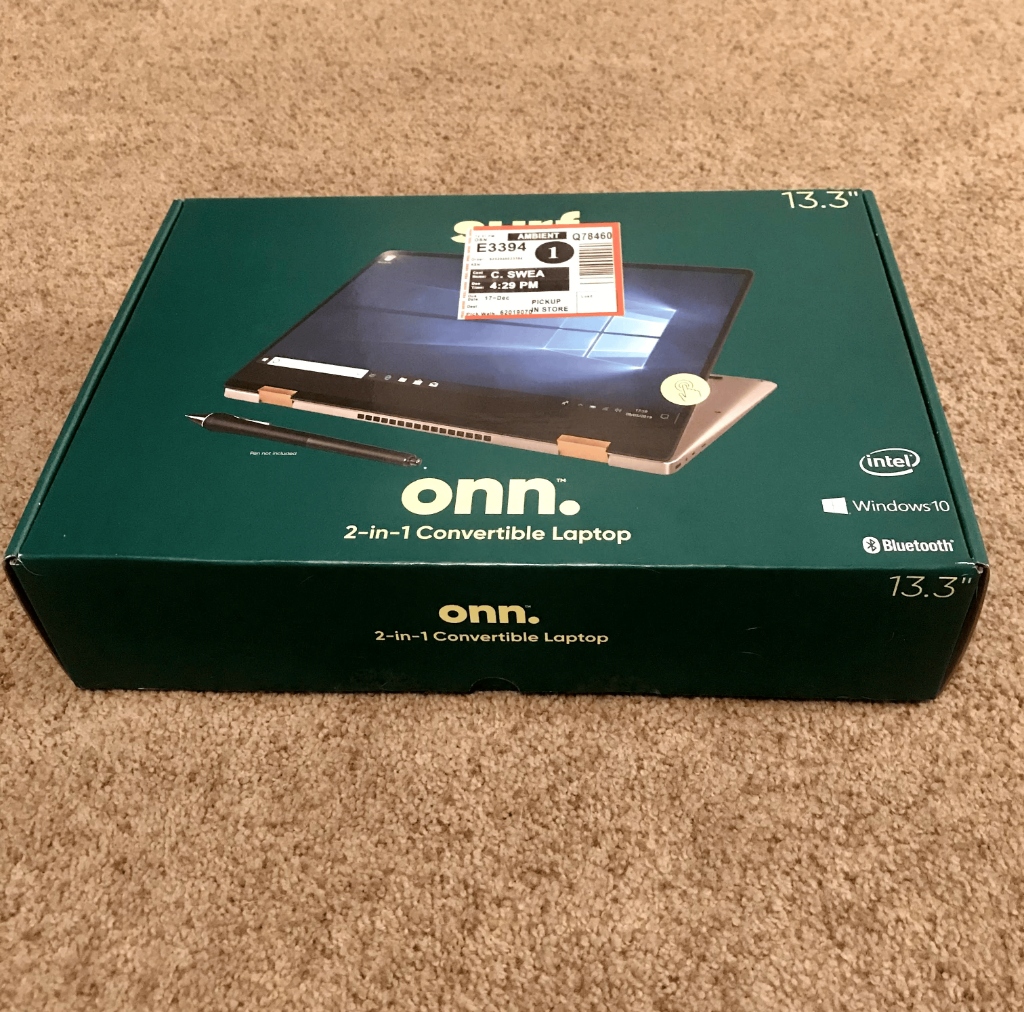 The actual Walmart pickup order box — ONN 100002434, picked up in-store
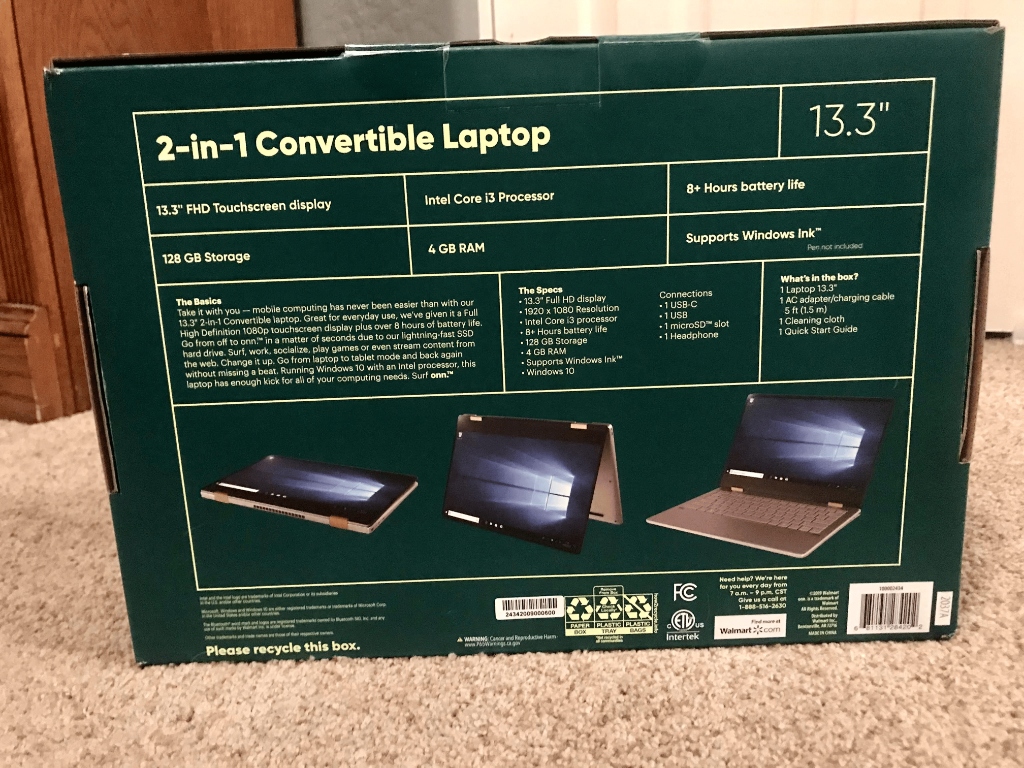 Box back — full specs confirmed: Intel Core i3, Windows 10, 4GB / 128GB
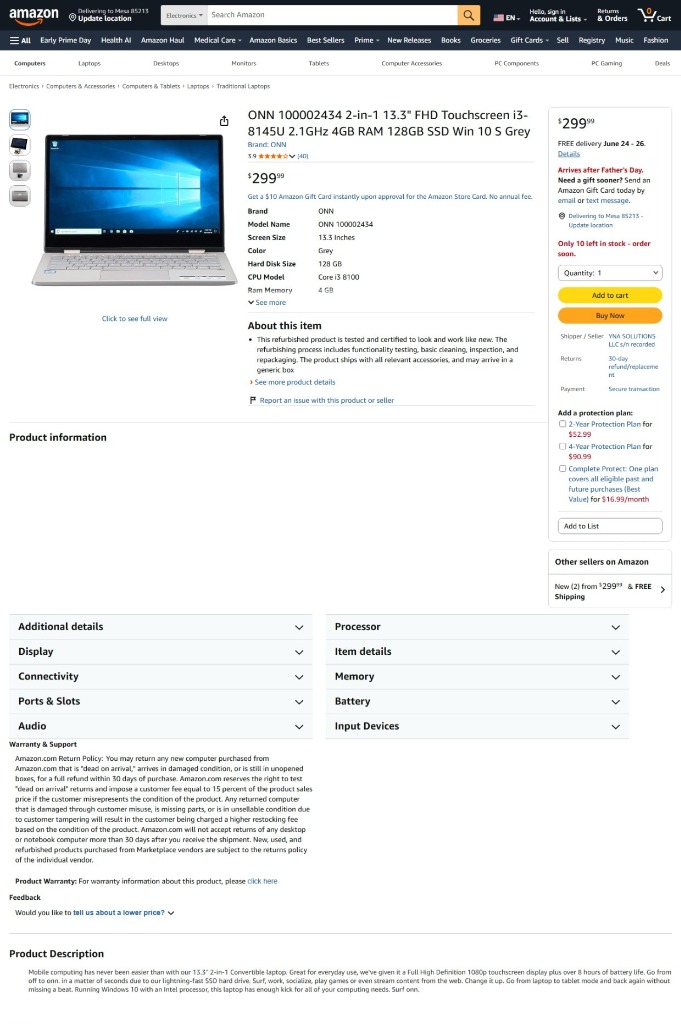 Amazon listing showing exact model specifications (B0842V96QN)
Compatibility
These driver exports came from a ONN 100002434 running Intel Cannon Lake-LP platform hardware. The table below shows confirmed and likely-compatible ONN Windows models. Models marked "Similar Platform" share the same Intel chipset generation and are strong candidates for compatibility.
| Model # | Full Name | CPU | RAM / Storage | OS | Status |
|---|---|---|---|---|---|
| 100002434 | onn. 100002434 2-in-1 13.3" FHD Touchscreen i3-8145U 2.1GHz 4GB RAM 128GB SSD Win 10 S Grey |
Intel Core i3-8145U Cannon Lake-LP |
4GB DDR4 / 128GB SSD | Windows 10 S | ✓ Source Device |
| 100002423 | onn. 100002423 2-in-1 13.3" FHD Touchscreen i3-8145U — variant of 100002434 |
Intel Core i3-8145U Cannon Lake-LP |
4GB / 128GB SSD | Windows 10 S | Similar Platform |
| 100002436 | onn. 100002436 13.3" Laptop variant (spec details limited) |
Intel Cannon Lake-LP likely i3-8145U |
4GB / 128GB | Windows 10 S | Similar Platform |
| 100019967 | onn. 100019967 Laptop variant (spec details limited) |
Intel exact CPU unconfirmed |
Unconfirmed | Windows | Similar Platform |
| 100002435 | onn. 100002435 10.1" Tablet with Detachable Keyboard 1.3GHz Quad-core, 2GB RAM, 16GB |
ARM Quad-core 1.3GHz | 2GB / 16GB | Android 9 | ✕ Android — Not Compatible |
msinfo32, press Enter. Under System Model and Processor, verify you see an Intel Core i3-8145U or similar Cannon Lake-LP CPU. If yes, these drivers are a strong match.
Exported from
onn. 100002434 · 2-in-1 13.3” FHD Touchscreen · Intel Core i3-8145U · 4GB RAM / 128GB SSD · Windows 10 S · Grey
Export 1 of 2
Exported while the laptop was still in Windows S Mode using only signed Windows binaries — dism.exe /online /export-driver and pnputil.exe /export-driver *. Raw, unorganized folders exactly as exported from the Windows driver store.
dism.exe /online /export-driver /destination:<path> (primary) + pnputil.exe /export-driver * <path> (fallback) — both are signed Windows binaries fully permitted in S Mode. Folder names are raw Windows driver store identifiers. No reorganization was applied.
Primary Intel integrated GPU driver for ONN laptops with Intel UHD 600 / 620. Covers display output, brightness control, and hardware acceleration.
Extension component for Intel integrated graphics. Required alongside the main iGD DCH package for full display functionality on ONN hardware.
Intel Graphics Control Panel component. Allows resolution, refresh rate, and display settings management from the Windows system tray.
Primary WiFi driver for Intel Wireless-AC adapters on ONN Cannon Lake laptops. Fixes "no WiFi networks found" after a clean Windows reinstall.
Alternate WiFi driver variant covering additional Intel 9000-series adapter IDs. Try this if netwtw06 doesn't match your specific wireless adapter.
WiFi driver for Intel 8000-series wireless adapters. Included as a secondary fallback — covers older Intel WiFi hardware IDs in the driver store.
Intel Bluetooth driver for ONN laptop. Fixes the missing Bluetooth toggle and device pairing failures that appear after reinstalling Windows.
Second Intel Bluetooth driver variant covering additional hardware IDs. Two separate variants were present in the ONN Windows driver store.
Core Realtek HDA driver — the primary audio driver for the ONN laptop sound card. Install this first if you have no sound or a missing audio device.
Realtek Audio Processing Object extension. Required for equalizer, enhancement, and microphone processing features alongside the base audio driver.
Intel HD Audio bus driver extension. Bridges the Intel audio controller and Realtek codec stack — needed for audio to function on this platform.
Realtek Audio Processing Object core component. Handles the software DSP layer including noise suppression, spatial sound, and audio enhancement.
Realtek Hardware Support App driver companion. Part of the modern DCH audio stack — pairs with realtekapo for full Realtek audio feature support.
Realtek Audio background service. Manages audio hardware events, jack detection, and the Realtek HD Audio Manager system tray application.
Intel Display Audio driver for HDMI and DisplayPort audio output via the integrated GPU. Required for sound when connecting to a TV or monitor via HDMI.
Realtek HDMI audio output driver. Enables audio over HDMI or DisplayPort when connecting the ONN laptop to an external display with speakers.
Core Intel Cannon Lake-LP platform system driver. Enables proper communication between the CPU, chipset, and all connected hardware on the ONN motherboard.
Intel Low Power Subsystem (LPSS) driver — covers I2C, SPI, and UART controllers used for touchpad, touchscreen, and sensor communication on ONN hardware.
Intel platform thermal management driver. Controls CPU thermal sensors and fan speed policies to prevent overheating and performance throttling.
Platform system driver for Intel Coffee Lake generation hardware. Present for cross-generation compatibility alongside Cannon Lake platform drivers.
Intel Graphics Memory Management (GMM) driver. Manages shared memory allocation between the system RAM and Intel integrated GPU on Cannon Lake hardware.
Intel Management Engine Interface driver. Required for firmware updates, power management features, and Intel security capabilities to function properly.
Intel Dynamic Platform and Thermal Framework (DPTF) ACPI component. Coordinates thermal policies between the operating system and platform firmware.
CPU participant module for Intel DPTF. Controls processor-level thermal throttling thresholds as part of the platform thermal management stack.
Realtek USB card reader driver. Enables the SD card slot on ONN laptops that include one. Also covers Realtek USB 3.0 host controller variants.
HID event filter for OEM input configurations. Handles hardware input event routing for keyboard, touchpad, and button input devices on ONN hardware.
2-in-1 / convertible hinge angle driver. Detects tablet vs. laptop mode and switches input accordingly. Present on ONN models with a 360-degree hinge.
KIONIX accelerometer / hinge sensor driver. Works with the hinge angle service to detect device orientation for automatic screen rotation.
Intel Media SDK runtime driver. Enables hardware-accelerated video encode/decode (H.264, HEVC) via the Intel Quick Sync Video engine on ONN hardware.
Intel Media Processing Extension runtime. Part of the Intel graphics software stack for media pipeline optimization on integrated GPU platforms.
SiS I/O controller driver. Manages low-level I/O operations between the chipset and connected peripheral devices on the ONN laptop platform.
Microsoft universal print driver variant. Provides basic Windows print capabilities — was present in the Windows driver store on this ONN device.
Second Microsoft universal print driver variant included in this driver store export. Covers additional printer class hardware IDs.
33 driver packages total in this export.
Download All (S-Mode Export) ZIPExport 2 of 2
After removing Windows 10 S Mode, the full Backup-Drivers v3.0 script was run in Windows Terminal as Administrator. This produced a second, fully organized export — friendly folder names, SHA-256 integrity hashes, complete machine profile, full PnP hardware IDs, and auto-generated restore scripts.
01_Display_Intel_UHD)Restore-AllDrivers.ps1Exact Methodology
No sketchy tools. No workarounds. Every step used either a signed Windows binary or a Microsoft Store app — so you know exactly where these drivers came from and how they were captured.
Brand-new ONN 100002434 from Walmart — picked up in-store. Boots into Windows 10 Home S Mode. Goal: capture drivers before anything changes.
S Mode blocked the custom script. Solution: install PowerShell 7 as a standalone app from the Microsoft Store (the only app source S Mode allows) — it runs scripts that PS 5.1 terminal cannot in S Mode.
PS7 ran the script using only dism.exe /online /export-driver and pnputil.exe /export-driver * — both signed Windows binaries, S Mode permitted. Result: 33 raw driver folders.
Removed S Mode via Settings → Update & Security → Activation. Then ran Backup-Drivers v3.0 in Windows Terminal (Admin) for the organized export with hashes, hardware IDs, and restore scripts.
The Tool That Made This Possible
The PowerShell script written specifically for this purpose — a complete driver archival utility for Windows 10 and 11. This is the exact script used for the organized (Export 2) backup, run in Windows Terminal as Administrator after removing S Mode.
How to run: Download the script, open Windows Terminal as Administrator (or PowerShell 7 as Administrator), navigate to the folder containing the script, and run: ./Backup-Drivers-v3.ps1 — The script will auto-detect your driver store and begin the backup. If you are still in Windows 10 S Mode, download PowerShell 7 from the Microsoft Store first.
Frequently Asked Questions
netwtw06.inf first — it covers Intel Wireless-AC 9560 and 9260, the most common adapters in these ONN models. If that doesn't match, try netwtw04.inf or netwtw08.inf.
.inf file. Right-click it and choose Install. Or use Device Manager: right-click an unknown device, Update driver, Browse my computer, point to the driver folder. To install all at once via PowerShell (as Administrator): Get-ChildItem "C:\drivers" -Recurse -Filter *.inf | ForEach-Object { pnputil.exe /add-driver $_.FullName /install }
.cat file, Properties, Digital Signatures.
dism.exe /online /export-driver + pnputil.exe /export-driver * (both signed Windows binaries S Mode allows). PowerShell 7 was installed from the Microsoft Store to run the script while still in S Mode. After switching out of S Mode (Settings → Activation), the full Backup-Drivers v3 script was run in Terminal (Admin) for the organized export. Both exports contain the same underlying drivers — the second is better organized and documented.